Item Types are often already part of an ORD workspace.
They are often already assigned to Feature Definitions (you might already be using them without even knowing).
They are often available and "ready for attachment" to already-placed Features.
The DOTs are building them for their needs (quantities, Pay Item info, asset management).
What about your needs?
Brainshift: Track Now; You can "Manage" Later
The platform is well-suited to reorganizing how you manage your Item Types' data. Track data early and often. It is a lot easier to harvest data that's already in the system and reorganize if you have to, than to retroactively harvest data from disparate platforms and sources.
Creating your own Item Types is really simple
Here's how:
Here's how to "attach" your (or any) Item Type to any element:
Item Types are often attached to Feature Definitions so that when Feature of the type is created the Item Types are already part of the data definition. Pay Item information is often pre-attached to Feature Definitions in DOT-supplied workspaces.
Creating a Display Rule to Highlight your Item Type
To highlight elements that have the Hey Look at Me property set to true, create a View Display Rule:
See the View Display Rules - Example article for details and a dataset.
- Details
- Category: Item Types
We are in the Age of Big Data, it's spilling over into Infrastructure Design. It's only going to get bigger.
We know what the future of Civil Infrastructure Design looks like: Digital Twins.
What can we adopt today that prepares us for tomorrow?
Easily and Profitably?
On the Bentley Platform, two complementary technologies bring tomorrow to us today, profitably (hint: start small, but start now)
Item Types are property sets that you can attach to elements (that's what AutoDesk calls them: "Property Sets").
In a nutshell, it's "Data in the Nutshell". Intrinsic Data.
You decide. You define.
Whatever you want.
The Power of a Big Data platform brings with it a monster: Big Noise.
Bentley's View Display Rules tames Big Data's monster.
Not only is our platform capable of showing much more data, we can now - with Item Types - pack a lot more data into our graphics.
View Display Rules allow you to
- resymbolize (hide/demote) irrelevant features (minimize noise)
- resymbolize (promote) relevant features based on their attributes.
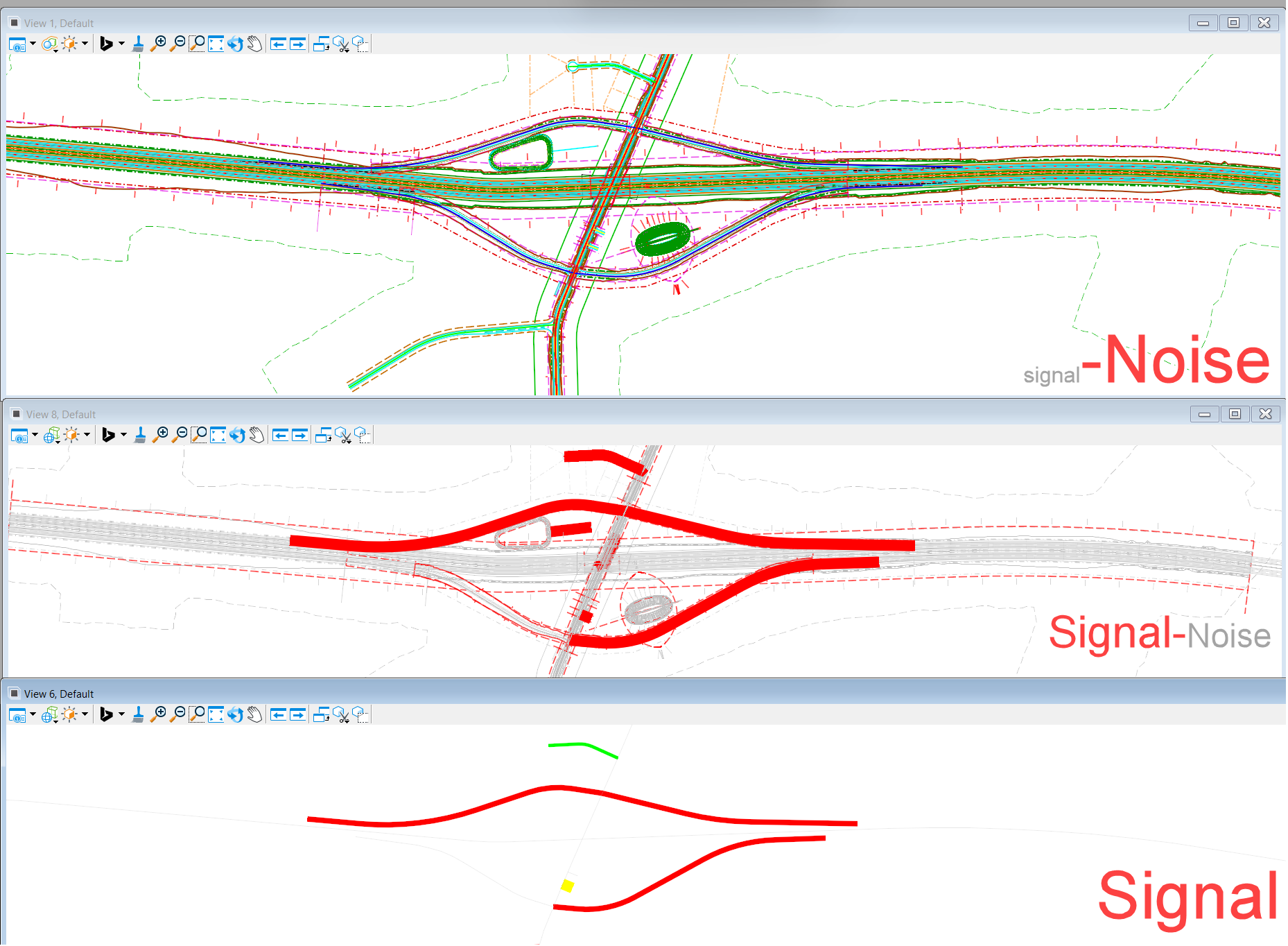
Here's how it all works: View Display Rules
Here is a quick hands-on to creating your own Item Types and Display Rules: Creating an Item Type: Easy!
The future is here. Get good with it now. It not only will cost you little, it'll improve your quality and make you money right away.
- Details
- Category: Item Types
I have embedded some URLs in some OpenRoads Item Types.
There's a bit of a philosophical conflict here.
If Item Types are an attempt to bring external data intrinsic to a feature, then linking out to another source can lead to a bias towards keeping everything in an external source.
But some information really does need to remain external.
Many designers and managers are getting in the habit of sharing information better via shareable documents or containers - OpenNote, Sharepoint Sites, webs, etc. This is a good trend.
I was reluctant to create a Property specifically for an External link, for fear of making it to easy to default to "external data" when the information might better be internal. An advantage of a separate field for an External reference is that that field can be checked for being non-empty vs. trying to pattern match to flag it for a View Display Rule,
The QC_Link View Display Rule I used searched multiple fields for "http" only. This not only is not a robust check, it is dramatically slower than a non-empty check.
- Details
- Category: Item Types